

NuPay is only available for the Brazilian market.
How it works
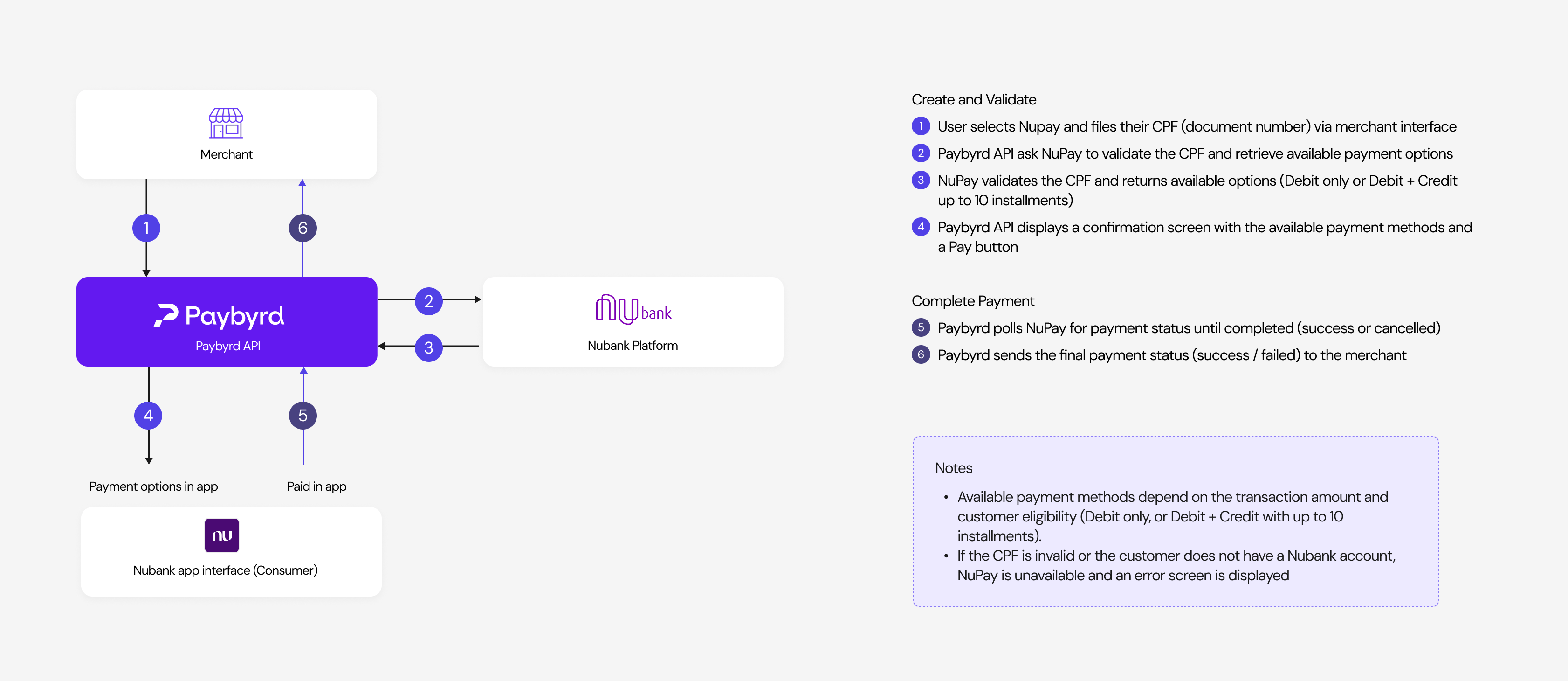
Payment flow
- The customer creates an order and selects NuPay as the payment method.
- The customer enters their CPF and submits.
- Paybyrd queries the NuPay API to validate the CPF and retrieve the available payment conditions for that customer and order amount.
- NuPay returns the payment options available for the order:
- Debit only — for lower order amounts.
- Debit, credit, and installments — for higher amounts; up to 10 installments are available.
- If the CPF is invalid or the customer does not have a Nubank account, NuPay is unavailable and an error screen is displayed.
- If the CPF is valid, a confirmation screen shows the available payment conditions. The customer reviews and clicks Pay.
- How the payment is completed depends on the device:
- Mobile — the Nubank app opens automatically for the customer to complete the payment.
- Desktop — a polling screen is displayed. The customer opens the Nubank app manually to complete the payment. There is no QR code available.
- Paybyrd polls the order status to confirm whether the payment was completed or cancelled.