

MB WAY is a digital payment method created by SIBS.

How it works

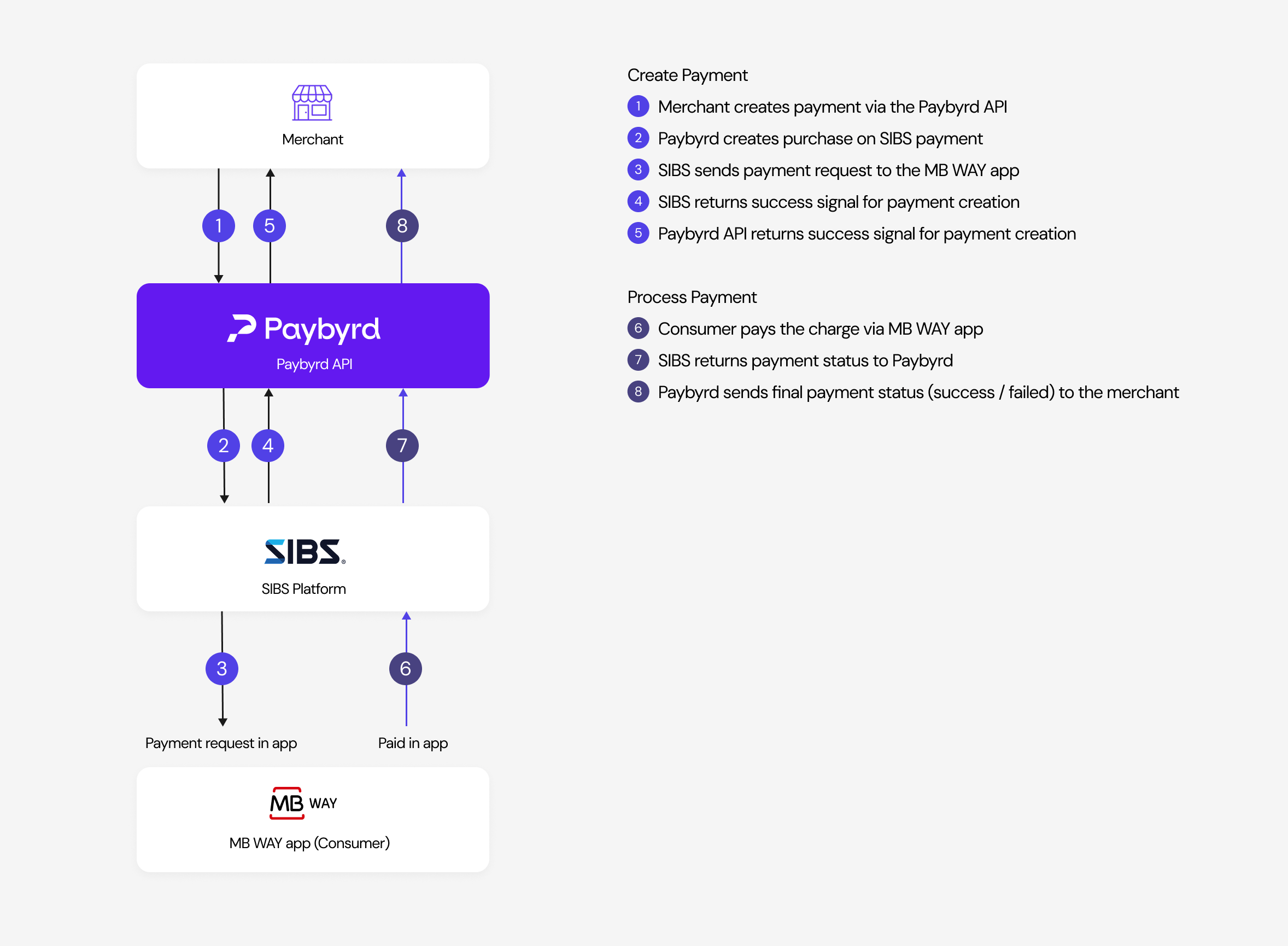
Flowchart depicting MB WAY payment flow MB WAY is an asynchronous payment method. When you create a payment, SIBS confirms that the payment was created and the transaction enters a processing status while waiting for the customer to pay. Once the customer completes the payment, SIBS sends a notification and the transaction status is updated to succeeded or failed.

Make a payment

This example shows the request that creates an MB WAY payment, and the response it returns:
curl --request POST \
 --url https://gateway.paybyrd.com/api/v2/payment \
 --header 'Accept: application/json' \
 --header 'Content-Type: application/json' \
 --header 'x-api-key: {your_api_key}' \
 --data '
{ 
 "type": "OnlineTransfer",
 "isoAmount": 1000,
 "currency": "EUR",
 "orderRef": "ABC123456",
 "brand": "MBWAY",
 "phoneCountryCode": "351",
 "phoneNumber": "969770085",
 "shopper": {
   "firstName": "John",
   "lastName": "Snow",
   "email": "john@snow.com",
   "shippingAddress": "Rua da Igreja Velha",
   "shippingPostalCode": "4715-591",
   "shippingCity": "Braga", 
   "shippingCountry": "PRT",
   "billingAddress": "Rua da Igreja Velha",
   "billingPostalCode": "4715-591",
   "billingCity": "Braga", 
   "billingCountry": "PRT"
 }
}'
{
 "phoneCountryCode": "351",
 "phoneNumber": "969770085",
 "mbWay": {
   "phoneCountryCode": 31,
   "phoneNumber": "625413019",
   "entityCode": "53939"
 },
 "type": "OnlineTransfer",
 "currency": "EUR",
 "orderRef": "ABC123456",
 "brand": "MBWAY",
 "paymentMethod": "mbway",
 "shopper": {
   "email": "john@snow.com",
   "firstName": "John",
   "lastName": "Snow",
   "shippingAddress": "Rua da Igreja Velha",
   "shippingPostalCode": "4715-591",
   "shippingCity": "Braga",
   "shippingCountry": "PRT",
   "billingAddress": "Rua da Igreja Velha",
   "billingPostalCode": "4715-591",
   "billingCity": "Braga", 
   "billingCountry": "PRT"
 },
 "code": "BYRD201",
 "description": "Payment being processed. Waiting for shopper",
 "status": "Processing",
 "requestId": "a325f758-edc1-4a4e-ba84-b630b0528217",
 "expiresAt": "2024-08-01T08:40:21.397267Z",
 "externalTransactionIdentifier": "s2NaTwRc28ujX3p8hpph",
 "acceptTokenization": false,
 "tokenType": "None",
 "transactionId": "81ebf619-e9e1-49ca-aa9d-5c8cf06a41c6",
 "amount": "10.00",
 "isoAmount": 1000
}
See the full API reference for all available fields.

Required Fields

FieldDescription
Type”OnlineTransfer”
IsoAmountTotal purchase amount in “ISO” format.
CurrencyThree letter “ISO” currency code.
OrderRefMerchant’s order reference
Brand”MBWAY”
phoneCountryCodeMBWay phone country code without symbols e.g. “351”
phoneNumberMBWay phone number e.g. “969770085”
To determine whether the transaction was accepted, check the code field. For successful scenarios, the expected code is BYRD201. See the full list of possible codes.

Notification

When the payment is finished by the user, Paybyrd will send a notification to the webhook URL defined in the Merchant’s account configuration. Your server will receive a request from Paybyrd with the transactionId of the updated transaction. Your server must return an HTTP success status: 200 OK, 201 CREATED, or 202 ACCEPTED. Any other response is treated as a failed delivery. The following is a sample webhook payload:
{
 "webhookId": "1642449226",
 "contextType": "event:paymentStatusChanged",
 "transactionId": "81ebf619-e9e1-49ca-aa9d-5c8cf06a41c6"
}
After receiving the webhook, query the transaction to get its full status details.

Query payment result

The example below shows how to query a transaction and the response it returns:
curl --request GET \
 --url https://gateway.paybyrd.com/api/v2/transactions/{transactionId} \
 --header 'Accept: application/json' \
 --header 'x-api-key: {your_api_key}'